Splitwise
- 4.1
- Rating
- 10.00M
- Installs
- Free
- Price

 Analysis by App-foxy
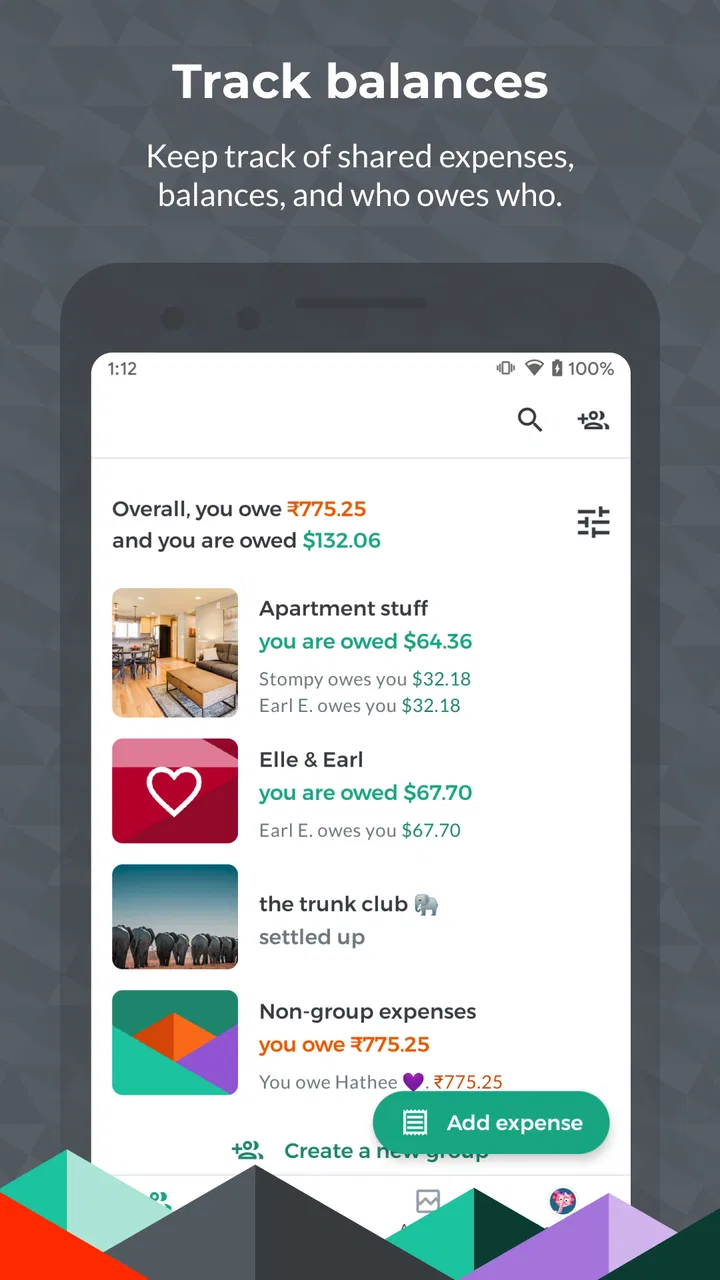
I like the idea behind Splitwise because it tackles a problem that is simple in theory and surprisingly awkward in real life: keeping track of shared spending without turning every coffee, taxi, or grocery run into an uncomfortable conversation. After using it as a finance app for group expenses, I found that its biggest strength is not complicated budgeting. It is the way it gives a shared record to people who would otherwise rely on memory, screenshots, and a long message thread.
That shared record is especially useful for roommates, couples, friends on a trip, and anyone who regularly pays on behalf of other people. The app is free to install, aimed at Everyone, and developed by Splitwise. It has built a large audience, with over ten million installs and a 4.2 average from around 189 thousand ratings. Those figures make sense to me: the basic problem is common, and the app is approachable once the group is organized.
Where Splitwise users usually get stuck
The first difficulty is often not entering an expense. It is deciding how the group should be structured. A group trip, a household, and a recurring dinner circle are different situations, and treating them all as one running balance can make the result harder to understand. I get better results when I create a separate space for each ongoing situation instead of placing every shared payment into one general list.
You May Also Like

 Blood Strike: 2.5 Anniversary
Blood Strike’s Loadouts Turn Every Drop Into a Tactical Gamble
A close look at Blood Strike’s custom loadouts: how fast access to signature weapons reshapes its battle royale rhythm, rewards preparation, and narrows the gap between fights.

 Pandora - Music & Podcasts
Pandora’s Music Is Easy to Start, but Harder to Recover
Pandora’s strength is its low-effort path from a seed to a station. Its weak spot is how much confidence it asks you to place in connection, setup, and quiet recovery.

 8 Ball Pool
 Is Built on Rivalries, Rematches, and Routine
A close look at the rivalries, rematches, shared routines, and unanswered safety questions that turn a quick pool match into a persistent mobile community.

 Samsung Music
’s Quiet Strength Is Playing What You Already Own
Its reach comes less from spectacle than from dependable access to a personal library. That simplicity is both the app’s strongest retention engine and its ceiling.

 AccuWeather: Weather Radar
AccuWeather Review: A Quick, Clear Forecast for Everyday Decisions
For everyday plans, the best forecast is the one you can understand quickly. AccuWeather makes rain timing, radar, and local conditions easy to act on, with a few trade-offs.

 Hill Climb Racing
Why Hill Climb Racing Still Turns Crashes Into One More Run
A tiny car, a bumpy hill and one more upgrade: Hill Climb Racing keeps resurfacing because its simple chaos makes every near-miss feel personal.
More From Our News Desk



Another common stumbling block is the difference between “who paid” and “who should share the cost.” Those are not always the same people. One friend may pay the full restaurant bill, while another covers the taxi and a third pays for groceries. If the split is entered casually, the final balances can look wrong even though the arithmetic is correct. I always pause to check the participants and the shares before saving an expense.
This matters most when a payment is not divided evenly. A meal may include different dishes, a household bill may be split according to an agreed arrangement, or one person may have joined the group halfway through a trip. The app can only reflect the instructions entered by the group. It cannot know that one guest skipped an activity or that a roommate was away for part of the month unless someone records that distinction clearly.
I also found that people sometimes expect the app to behave like a bank account. It does not replace the actual transfer of money. Instead, it keeps track of who owes whom and helps the group settle the result. That distinction is important for anyone looking for direct payments, automatic bill collection, or a full personal finance dashboard. Splitwise is best understood as a shared expense ledger, not as a banking service.
Why the first entry deserves extra care
The first expense creates the habits for the whole group. If the group starts with vague descriptions such as “stuff” or “trip costs,” it becomes harder to review the list later. I prefer short but specific labels, such as “airport train,” “market groceries,” or “museum tickets.” This is a small effort at the beginning, but it saves time when someone questions a balance several days later.
I also recommend agreeing on a simple rule before adding several expenses. Decide whether shared meals are split equally, whether personal items stay separate, and whether small purchases should be included at all. Splitwise can calculate the result, but it cannot settle a disagreement about what the group considers fair. A clear rule prevents the app from becoming the place where an unresolved argument is discovered.
There is another subtle issue: a balance is not necessarily an urgent debt. If I owe a friend a small amount after one lunch, that may be fine to settle immediately. In a household, however, several expenses may be intentionally allowed to accumulate. The app shows the running position, but the people involved still need to decide when and how to settle. That human agreement remains outside the software.
Setup checks that prevent avoidable confusion
My first setup check is the participant list. I make sure every person is represented by the account or identity the group actually uses, rather than creating duplicate entries with slightly different names. A duplicate can split one person’s expenses across two places and make the group balance look unreliable. If someone changes phones or joins later, I check the member list before assuming that an expense disappeared.
The next check is the currency and amount shown on each entry. Travel makes this particularly important because a group may move between countries or discuss costs in more than one currency. I avoid mentally converting amounts while entering them. I record the amount as it appears on the receipt or payment, then make sure everyone understands how the group is handling the conversion. The app can organize the record, but the group still needs a consistent approach.
Before adding a large batch of expenses, I enter one small test expense and inspect how the resulting shares appear. This is a useful setup habit because it exposes misunderstandings about participants, equal versus custom splits, and who paid. If the test looks right, I continue. If not, correcting one entry is much easier than repairing a week of transactions.
Notifications and account access are also worth checking at the start. If one person does not see a group invitation or an updated expense, I first confirm that the invitation went to the intended account and that the person is looking in the correct group. I also check whether the app is current; the present version is 26.2.2 and requires an operating system version of 9 or later. Updating the app and restarting it are sensible first steps when screens do not refresh as expected.
A practical setup for roommates
For a shared home, I would separate recurring household costs from occasional personal purchases. Electricity, cleaning supplies, and a jointly agreed grocery run can belong in the household group. A private meal or a personal subscription should not be added simply because it happened in the same apartment. This separation makes the monthly balance easier to trust.
I would also add expenses soon after paying them rather than waiting until the end of the month. Delayed entry creates two problems: receipts get lost, and people forget who was present. A useful routine is to record the payment immediately, add a short description, and review the group before settling. The app then becomes a light daily habit instead of a stressful monthly reconstruction.
For a trip, I prefer one group for the trip and a clear convention for optional activities. If only some travelers went on a boat tour, that expense should include only those people. If everyone used the airport transfer, it can be shared across the full group. This is one of the strongest practical uses of Splitwise because the app keeps the decisions visible instead of leaving them buried in a chat.
Recovering when the workflow goes wrong
When a balance looks incorrect, I do not start by deleting everything. I review the individual expenses in date order and look for the first entry that does not match the group’s agreement. Most errors come from a wrong payer, a missing participant, or an accidental equal split. Finding the earliest mismatch usually explains the later total.
If an expense was entered twice, I remove or correct the duplicate rather than adding a compensating expense. A fake adjustment may make the total look right temporarily, but it leaves the history difficult to understand. Clean records matter because people often revisit them days later, when the original payment is no longer fresh in memory.
For a mistaken split, I edit the original entry when possible and then ask the affected people to review the updated balance. I would not rely on a private message saying “I fixed it” because the group needs to see the same record. Shared visibility is the whole reason to use this kind of app.
Sometimes the issue is not arithmetic but timing. A person may settle an amount outside the app and forget to record that settlement. In that case, the displayed balance can remain open even though the real-world debt is finished. I treat the settlement record as important as the original expense. Otherwise, the group may try to pay the same amount twice.
What to do when someone cannot see the change
If another member does not see a new expense, I first check whether the entry was saved in the intended group and whether that person was included. Then I ask them to refresh the app, confirm their connection, and reopen the group. If the problem continues, both people should check for an available app update and restart the app before trying more complicated steps.
I avoid creating a second copy while waiting for synchronization. That is an easy reaction, but it can produce a duplicate once the original finally appears. A better approach is to keep the receipt or payment note nearby, wait briefly, and verify the group history again. If the entry still cannot be found, re-entering it once is safer than repeatedly tapping save without checking.
For an invitation problem, I confirm the exact account or contact used for the invitation and ask the recipient to look for the group from inside the app rather than relying only on a notification. If the recipient has more than one account or has recently reinstalled the app, identity confusion is more likely than a calculation error.
There is also a useful recovery habit for groups that have become messy: stop adding new expenses for a moment and agree on a cutoff point. Review everything before that point, correct the history, and then resume with a shared rule. Without a cutoff, people may keep editing old entries while others add new ones, making it difficult to know which balance is current.
When the app is not the cause
Not every disagreement is a software problem. If two people remember different arrangements, Splitwise can display the entered version accurately while one of them still considers it unfair. The solution is to discuss the arrangement and then update the expense, not to keep refreshing the app. I appreciate the app most when the group uses it as a neutral record, not as an authority that decides personal disputes.
Receipts can also be the real source of trouble. A restaurant bill may include a service charge, shared items, and personal items, while a person entering it remembers only the rounded total. Before blaming the calculation, I compare the entry with the receipt and explain any unusual split in the description. That small note can prevent a long back-and-forth later.
Connectivity and device state can create the appearance of missing information. A slow connection, an outdated installation, or a group opened from the wrong account can all lead to confusion. My general troubleshooting order is simple: check the group, check the participant, check the connection, update the app, restart it, and only then consider entering the expense again.
The app is also not the right tool for every financial task. If I wanted investment tracking, detailed income planning, tax preparation, or a complete household budget, I would choose a dedicated finance application. Splitwise focuses on shared spending, and that focus is a benefit when the problem is settling group costs. It becomes a limitation when someone expects a complete picture of personal finances.
Privacy is another reason to think about fit. A shared expense record reveals spending details to the people in the group. That is appropriate for roommates or travel companions who need the information, but less suitable for someone who wants a private ledger with no shared visibility. I would be selective about who joins each group and avoid adding unrelated personal purchases merely for convenience.
Free access and the paid boundary
The app is free, which makes it easy for a group to try without asking everyone to commit money first. There are in-app purchases ranging from $0.99 to $59.99 per item, so I would review the purchase screen carefully before assuming every capability is included at no cost. The important practical question is whether the free experience covers the group’s basic expense tracking needs.
For a short trip or occasional dinners, the free entry point may be enough to judge that for yourself. For a household that uses the service constantly, it is worth checking which tools are essential before paying. I would not upgrade just because the group has many expenses; I would upgrade only if a specific paid feature solves a repeated annoyance in the way I use the app.
My practical verdict after using it
I recommend Splitwise to people who regularly share costs and want a common record without maintaining a spreadsheet. It is particularly strong when several people pay at different times, when the split is not always obvious, or when a trip produces too many small expenses to remember. The app turns that scattered activity into something the group can inspect and settle.
Its best quality is clarity, provided the group enters information carefully. The strongest workflow is to create the right group, agree on splitting rules, record expenses promptly, and review unusual entries before they become forgotten details. The less obvious lesson is that organization matters more than speed. A fast but vague entry can create more work than a careful one.
I would skip it if you only need a private spending diary, if your group refuses to maintain a shared record, or if you need direct banking and full financial planning. A spreadsheet may be better for a highly customized accounting process, while a banking tool may be more appropriate for actual transfers and account management. Splitwise sits between those options: more structured than a chat thread, but narrower than a complete finance suite.
For everyday use, imagine three friends sharing a weekend away. One pays for transport, another covers groceries, and the third handles tickets. Instead of calculating everything in the final hour, each person records the payment while it is still easy to remember. At the end, the group can review the entries, correct any activity that not everyone joined, and settle the resulting balances. That is exactly the kind of small organizational problem this app handles well.
Splitwise was released on September 12, 2011, and its continued popularity suggests that shared expenses remain a persistent problem rather than a passing trend. I would describe it as practical rather than glamorous: it does not remove the need for honest communication, but it makes the numbers easier to discuss. For friends, roommates, and travelers who want fewer awkward calculations, the real value is a dependable shared history of who paid and who still needs to settle.
My final advice is to start with one small group and a test expense. Use clear descriptions, check every participant, and record settlements instead of assuming everyone remembers them. If that routine feels natural, the app can become a useful part of group life. If the group cannot agree on what should be shared, no expense tracker will solve that underlying issue. In the right situation, though, Splitwise is a straightforward and genuinely helpful finance app for keeping shared spending fair and visible.
FAQs for Splitwise
01What is Splitwise and how does it work?
Splitwise is a finance app designed to help you manage shared expenses with friends, family, or roommates. It allows you to input shared bills and expenses, and automatically calculates who owes whom. The app provides a clear breakdown of debts and credits, making it easier to settle up and avoid financial misunderstandings.
02Is Splitwise free to use, or does it have a premium version?
Splitwise offers a free version with essential features for managing shared expenses. However, it also has a premium version called Splitwise Pro, which provides additional features like currency conversion, receipt scanning, and advanced charts. The subscription fee for Splitwise Pro enhances the experience but isn’t necessary for basic use.
03How does Splitwise handle different currencies?
Splitwise supports multiple currencies, making it ideal for international use. In the free version, you can set a default currency for your group, and members can enter expenses in different currencies. With Splitwise Pro, currency conversion is automatically handled, providing real-time updates and accurate conversions.
04Can Splitwise integrate with other payment platforms?
Yes, Splitwise can integrate with payment platforms like PayPal and Venmo for easy settlement of debts. While it doesn’t directly process payments, it provides links to these services so you can quickly pay back friends. Keep in mind that these integrations may be subject to regional availability.
05Is Splitwise secure in terms of data privacy?
Splitwise is committed to user privacy and security. It uses encryption to protect your data and follows best practices for data storage. While it requires basic personal information for account creation, it does not sell or share your data with third parties, ensuring your financial details remain private.
Pros
- Easy to track shared expenses.
- Supports multiple currencies.
- Intuitive user interface.
- Syncs across devices seamlessly.
- Free version offers robust features.
Cons
- Limited features in free version.
- Ads can be intrusive at times.
- Requires internet for syncing.
- No offline mode available.
- Advanced features need subscription.

Splitwise
Gallery